
AI Performance Metrics: Seven KPIs Every Brand Should Track
Why AI Needs Its Own Metrics
Agentic commerce is a new channel. When a user asks ChatGPT for a product recommendation or Perplexity for a service comparison, there’s no “page one” to rank on. There’s a citation, a summary, or nothing at all. Your brand either shows up in the AI-generated answer, or it doesn’t exist in that conversation.
This channel needs its own performance report - the same way you have reports for paid, organic, social, and email.
At WISLR, we’ve spent considerable time researching and developing the metrics that matter for this new channel. The KPIs that track AI-driven discovery are fundamentally different from anything in your existing dashboards. They measure whether AI systems can access your content, whether they’re citing it, and whether that visibility is converting into revenue.
The seven KPIs below represent our framework for building an AI channel report - from the moment a bot crawls your site to the moment a customer converts. This is the report every brand should be creating alongside their existing channel performance reports.
Seven Key Performance Indicators
These seven metrics form a full-funnel view of AI performance - from infrastructure to revenue. Let’s break each one down.
1. AI Bot Crawl Rate
What it measures: The percentage of your pages that AI crawlers (GPTBot, ClaudeBot, PerplexityBot, etc.) successfully access and process for training data.
This is the foundation metric. If AI bots can’t crawl your content, your pages won’t appear in training data.
How to track it:
- Monitor server logs for AI-specific user agents (GPTBot, anthropic-ai, PerplexityBot, Bytespider)
- Compare total crawlable pages versus pages actually crawled per bot
- Track crawl frequency trends over time
What good looks like: High-value pages (product pages, pillar content, category pages) should show consistent crawl activity from major AI bots.
Common issues: Overly restrictive robots.txt rules, JavaScript-rendered content invisible to bots, server-side rendering failures, and slow page response times that cause crawlers to abandon requests.
2. AI Fetch Rate
What it measures: How often your brand or content gets cited, referenced, or surfaced in AI-generated responses.
Crawling is necessary but not sufficient. The fetch rate captures whether AI systems actually pull your content into their answers. This is the AI equivalent of “impression share” - how visible you are when relevant queries are asked.
How to track it:
- Monitor server logs for AI fetch-specific user agents, which carry different signatures than the bots used for crawling and training
- Distinguish between crawl requests (training data collection) and fetch requests (real-time content retrieval for generating answers)
- Track fetch frequency and which pages are being pulled into live AI responses
What good looks like: Maintaining or increasing fetch requests from real-time user conversations over time, indicating that AI platforms are actively pulling your content to answer live queries.
Common issues: Thin content that doesn’t provide enough signal for AI to cite, missing structured data that prevents accurate attribution, and competitor content that’s better optimized for AI consumption.
3. AI Referral Traffic Rate
What it measures: The volume and percentage of website visitors arriving from AI platforms.
This is where AI visibility starts translating into business impact. When AI systems cite your content with a link, users click through. Tracking this traffic separately from organic search gives you a clear picture of AI’s direct contribution.
How to track it:
- Analyze server logs and HTTP referral headers for traffic originating from AI platforms (chat.openai.com, perplexity.ai, gemini.google.com)
- Segment AI referral traffic from organic search and direct traffic using referrer data
- Track AI referral volume as a percentage of total site traffic over time
What good looks like: A growing share of referral traffic from AI platforms visible in your server logs and referral header data.
Common issues: Attribution gaps when AI platforms don’t pass referrer data, and miscategorized traffic lumped into “direct” or “other” buckets in your logs.
4. AI Conversion Rate
What it measures: The percentage of AI-referred visitors who complete a purchase or desired action.
Current behavior analytics tools have blind spots when it comes to AI-referred traffic. Sessions may not carry referrer data consistently, and traditional attribution models weren’t built for this channel. That’s why the best place to develop this metric is in your server logs as a leading indicator, then cross-reference it with transaction data from your order management system where possible.
How to track it:
- Use server log data to identify sessions originating from AI referral headers
- Cross-reference AI-referred sessions with transaction records in your order system
- Compare conversion patterns from AI-referred traffic against other channels using log and order data
What good looks like: A growing number of transactions that can be traced back to AI referral sessions in your logs, with order data confirming completed purchases.
Common issues: Incomplete referrer data making it difficult to tie sessions to conversions, gaps between log data and order system records, and lack of a unified view across server logs and transaction systems.
5. AI Cart-to-Buy Rate
What it measures: The checkout completion rate specifically for visitors who arrived via AI referral.
No off-the-shelf analytics tool reliably segments this today. You need to build your own tracking by connecting AI referral data from your server logs to cart and checkout events in your order system. This gives you accuracy and confidence that pre-built dashboards can’t match right now.
How to track it:
- Tag AI-referred sessions in your server logs using referral header data
- Match those sessions to cart creation and checkout completion events in your order system
- Calculate the cart-to-buy ratio for AI-referred sessions versus other traffic sources
What good looks like: AI-referred sessions completing checkout at rates comparable to your strongest channels, confirmed through your own log-to-order data pipeline.
Common issues: Difficulty maintaining session continuity between log data and order records, price or availability discrepancies between what AI cites and what’s actually in the cart, and the manual effort required to build and maintain this tracking before vendor tools catch up.
6. Revenue from AI
What it measures: Total revenue attributable to AI-driven discovery, including both direct (last-click) and assisted (multi-touch) attribution.
This is the bottom-line metric. It answers the question every executive asks: “What is AI visibility actually worth to us in dollars?”
How to track it:
- Build a pipeline that connects your server logs (AI bot fetch activity and AI referral sessions) to your order management or transaction system
- Match AI-referred sessions identified in logs to completed purchases and their dollar values in your order data
- Segment revenue by AI source where possible (different AI platforms leave different referral signatures)
What good looks like: A growing, verifiable revenue number tied directly to AI-referred sessions, cross-referenced with your order system so the data holds up to scrutiny. Revenue per AI-referred visit that’s competitive with other channels.
Common issues: The infrastructure to connect log data to transaction records doesn’t exist out of the box - you have to build it. Session handoff between log identification and order completion can be lossy, and there’s no industry-standard tooling yet. This is a metric you’ll refine over time as your tracking matures.
7. Total Products with Multi-Modal Content
What it measures: The percentage of your product catalog that has comprehensive multi-modal content - video, images, and text descriptions - optimized for AI consumption.
This metric goes beyond the technical foundation. AI platforms increasingly favor content-rich product pages when making recommendations, but getting there requires close coordination between your technical team and your content team. Products with only basic text descriptions lose out to competitors who invest in video demos, multiple image angles, comparison tables, and structured specifications. This is a content strategy initiative as much as it is a technical one - your content teams need to be part of the planning, production, and prioritization.
How to track it:
- Audit your product catalog for content completeness across all content types: written descriptions, product images, video, and structured specifications
- Build a scoring model with your content team that rates each product’s multi-modal readiness - this gives both technical and content stakeholders a shared language for prioritization
- Track coverage percentage over time and tie improvement milestones to content production calendars
What good looks like: Priority SKUs (top sellers, highest margin) have complete multi-modal content first, with a roadmap to expand coverage across the active catalog. Content and technical teams are aligned on what “complete” means for each product type.
Common issues: Bulk product imports with minimal descriptions that never get enriched, content teams not looped into AI visibility goals, no shared workflow between technical teams and content production, missing alt text on product images, and no video content for products that benefit from demonstration.
Building Your AI Measurement Framework
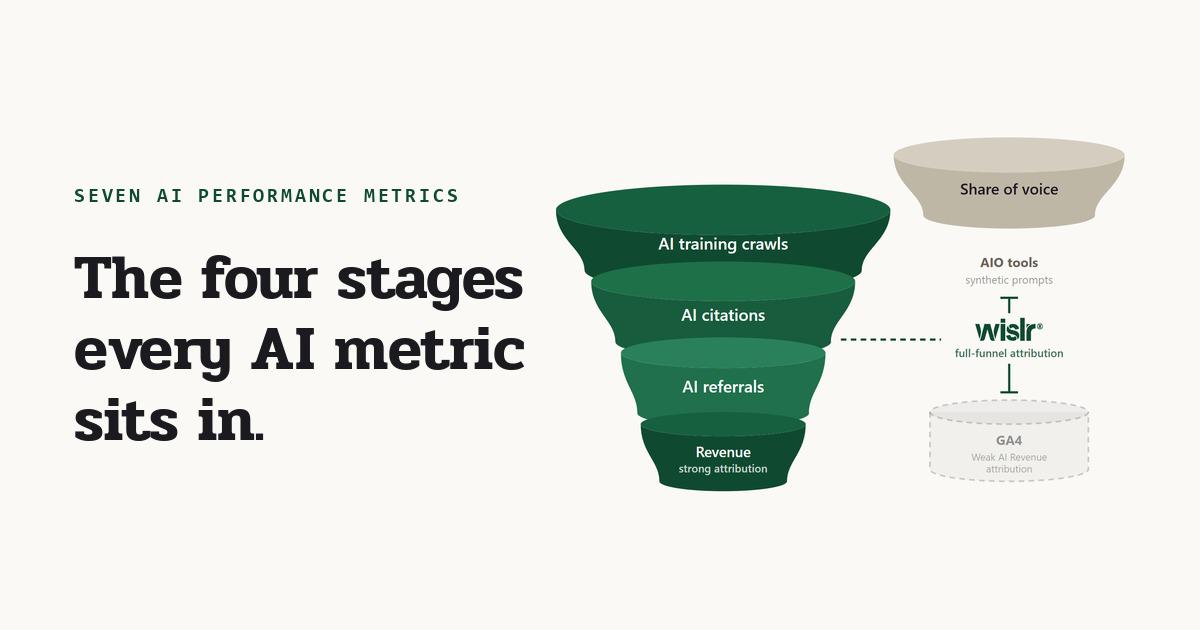
These seven metrics aren’t meant to be tracked in isolation. They form a funnel:
- Infrastructure (Bot Crawl Rate) - Can AI access your content?
- Visibility (Fetch Rate) - Does AI cite your content?
- Traffic (Referral Traffic Rate) - Do users click through from AI?
- Action (Conversion Rate + Cart-to-Buy Rate) - Do visitors convert?
- Revenue (Revenue from AI) - What’s the dollar impact?
- Readiness (Multi-Modal Content) - Are you prepared for what’s next?
If your bot crawl rate is low, fixing conversion rate optimization won’t help. If your fetch rate is strong but referral traffic is weak, the problem is likely in how AI platforms link back to you. The funnel tells you where to focus. If you want to see how this framework applies to a single platform - including Operator transaction tracking and SearchGPT citation metrics - read our OpenAI KPIs and Success Metrics breakdown.
Start With What You Can Measure Today
You don’t need a perfect attribution system to begin. Start with server log analysis for bot crawl rates and referral source segmentation in your existing analytics. These two metrics alone will tell you whether AI platforms are accessing your content and sending you traffic.
As your measurement matures, layer in fetch rate monitoring, conversion segmentation, and revenue attribution. The brands that start measuring now will have months of baseline data when their competitors are still figuring out where to begin.
These Metrics Are Hard to Capture Alone
The reality is that most of these KPIs don’t have off-the-shelf tooling yet. Building the log pipelines, connecting them to order data, and maintaining the tracking takes real engineering effort - and most brands don’t have the internal bandwidth to stand it up from scratch.
The WISLR team has built systems to bring these metrics online for brands, so you don’t have to start from zero. If you want help getting this measurement framework in place, we’ll walk through what’s possible for your setup.
Want to know if AI bots can actually crawl your site? Our AEO Readiness Guide audits your technical infrastructure - JavaScript rendering, schema markup, ghost pages, and more - so you can fix the foundation before optimizing the funnel.
Frequently Asked Questions
What metrics are not tracked by standard analytics tools for AI-driven traffic?
Standard analytics tools like Google Analytics do not reliably segment AI-referred traffic from organic or direct visits. Specifically, they miss AI bot crawl rate (which requires server log analysis for user agents like GPTBot, ClaudeBot, and PerplexityBot), AI fetch rate (which uses different user agent signatures than training crawlers), and AI-specific conversion and cart-to-buy rates (which require connecting server log referral data to order management system records). These seven KPIs - bot crawl rate, fetch rate, referral traffic rate, conversion rate, cart-to-buy rate, revenue from AI, and multi-modal content coverage - must be built from server logs and transaction data rather than pre-built dashboards.
How does AI fetch rate differ from AI bot crawl rate?
AI bot crawl rate measures how many of your pages AI crawlers successfully access for training data. This is the foundation metric for whether your content enters an LLM’s knowledge. AI fetch rate measures how often AI systems retrieve your content in real time to generate answers during live user conversations. The two use different user agent signatures in server logs: crawl requests collect training data, while fetch requests pull content into active responses. A high crawl rate with a low fetch rate means your content is in the training data but isn’t being cited when users ask relevant questions.
How do you track revenue from AI referral traffic when no off-the-shelf tool exists?
You build a custom pipeline connecting three data sources: server logs (to identify AI-referred sessions via HTTP referral headers from platforms like chat.openai.com, perplexity.ai, and gemini.google.com), your order management system (to match those sessions to completed purchases and dollar values), and referral signature segmentation (to attribute revenue to specific AI platforms). This pipeline replaces the attribution role that tools like Google Analytics play for paid and organic channels. The infrastructure doesn’t exist out of the box. It requires engineering effort to connect log data to transaction records and maintain session continuity through checkout.
What is the correct order for building an AI channel performance report?
The seven KPIs form a funnel that should be measured in sequence: infrastructure (AI bot crawl rate), visibility (AI fetch rate), traffic (AI referral traffic rate), action (AI conversion rate and cart-to-buy rate), revenue (revenue from AI), and readiness (multi-modal content coverage). This order matters because problems at the top of the funnel make downstream metrics irrelevant. If your bot crawl rate is low, optimizing conversion rate won’t help. Start with server log analysis for bot crawl rates and referral source segmentation, then layer in fetch rate monitoring, conversion segmentation, and revenue attribution as your measurement matures.
What makes AI referral traffic different from organic search traffic in server logs?
AI referral traffic arrives from specific platform domains like chat.openai.com, perplexity.ai, and gemini.google.com and is identified through HTTP referral headers in your server logs, not through traditional search engine referral patterns. Unlike organic search traffic, AI referral traffic often gets miscategorized as “direct” or “other” in standard analytics because AI platforms don’t always pass referrer data consistently. The only reliable way to segment AI referral traffic is through server log analysis of referral headers, which is why this metric can’t be measured accurately using behavior analytics tools alone.
Why does multi-modal content coverage matter for AI visibility?
AI platforms increasingly favor content-rich product pages when generating recommendations. Products with only basic text descriptions lose out to competitors who have video demos, multiple image angles, comparison tables, and structured specifications. Multi-modal content coverage measures the percentage of your product catalog that has comprehensive video, image, and text content optimized for AI consumption. This is both a technical and content strategy metric. It requires coordination between technical teams (for structured data and rendering) and content teams (for production and prioritization), with priority given to top-selling and highest-margin SKUs first.